


OneMain Financial
4.73.33K Reviews
App Specs
- Version
- 10.31.0
- Updated On
- License
- Free
- Downloads
- 1,000,000+
- Developer
- OneMain Financial
- Categories
- Finance
- Platform
- Android, iOS
Screenshots

 Analysis by AppCompare
If you’re deciding whether a loan-management app would actually make your routine easier, the key question is whether it helps with the account you already have. OneMain Financial is a finance app from OneMain Financial, built around managing a loan, making payments and keeping an eye on credit. I see its value as practical rather than all-purpose: it is most relevant when your financial relationship is already with OneMain, not when you want one place to manage every bank account, card and loan.
Cost and the kind of value to expect
The app is free to download, so trying it does not require paying an app purchase price. That is useful if your goal is simply to check a loan account or handle payments on your phone. Free access, however, should not be confused with a free loan: the app is a way to manage financial services, not a promise that borrowing itself costs nothing. I would assess any loan separately by looking at its terms and whether the payments fit your budget.
OneMain Financial has a 4.7 average from around 23,000 ratings, and it has been installed over a million times. Those figures suggest that many people use it, but they cannot tell you whether it will suit your specific account or solve a problem you have. The useful test is much more personal: can you find the details you need, make a payment without friction, and keep track of what is coming due?
The app is rated for Everyone, and version 10.26.0 is listed for devices running Android 7.0 or later. It was released in 2014, and OneMain Financial continues to develop it. If you are considering installing it, I would first check that your device meets the operating-system requirement and that you are choosing the official app, especially before entering financial details.
Using it to keep a loan on track
Once you’re logged in, the main benefit of a loan-focused app is having the account information you need in a single place rather than hunting through old messages or paperwork. I would use the home screen as a quick check before payday or when planning the month: confirm what is due, review the account, then decide whether a payment needs attention. That small routine can make a fixed obligation easier to remember, even if it does not change the loan terms.
For someone who already has a OneMain loan, the app is more directly useful than a general budgeting app for checking that particular account. A budgeting tool may give a broader view of spending across providers, but it may not offer the same direct access to a lender’s loan-management workflow. Conversely, if your priority is seeing all your finances together, a single-lender app will not replace a multi-account dashboard. I would treat them as tools for different jobs rather than expecting one to do both.
Payments, timing and practical routines
The published app description centers on managing a loan, making payments and tracking credit. That makes payment handling the most obvious everyday reason to open it. If you are paid on a predictable schedule, a sensible routine is to check the upcoming obligation when you review your monthly budget, then make a payment or plan for it in good time. That is more reliable than waiting for a reminder to be the only prompt you use.
Worth Reading Before You Choose

EA SPORTS FC Mobile 26 Is a Bigger Football Game, but It Takes Time

Flipboard Shows What News Apps Must Do Beyond the Feed

Switching to Android Auto Means Rethinking Your Driving Routine

Google Calendar Makes a Crowded Week Easier to Manage

Ludo King Makes the Most of the Minutes Between Plans

Baby Panda World Brings Quick Play to Modern Phones, but Its Game Library Feels Busy
The original review describes payment scheduling and automatic payments as available features. Before relying on an automatic arrangement, I would personally check the payment date and funding account carefully, and make sure the amount and schedule match what I intend. Automation can reduce the chance that I forget a recurring task, but it can also make a payment less visible in my day-to-day routine. I would still review the account periodically rather than assuming a scheduled payment has taken care of every detail.
Consider a realistic end-of-month situation: you are checking household bills after payday and want to know whether your loan payment is already accounted for. Opening the lender’s app can make that check more direct than searching through email or a paper statement. If something looks different from what you expected, the sensible next step is to investigate before making assumptions. A screen that helps you monitor an account is useful, but it is not a substitute for checking a discrepancy or contacting the lender when an account question needs a person’s attention.
Notifications can help when you are away from your desk, but I would use them as prompts rather than as a complete payment system. A notification is easy to miss, and a phone alert does not by itself confirm that a payment has cleared or that your account is in good standing. Pairing alerts with a calendar reminder or a regular monthly account check gives you a second chance to catch something important. This is especially worthwhile if your pay dates move around or your budget is tight.
Credit tracking and planning without overrelying on estimates
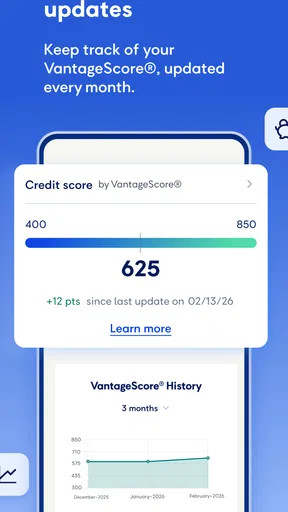
Credit tracking can be helpful when you are trying to understand your broader financial picture, but I would not treat a tracking view as a complete credit report or a guarantee that every lender will see the same information. It is best used as one point of reference alongside the records and statements that matter for your own decisions. If you are preparing for a major application, take time to review the relevant official documents instead of relying on a quick in-app glance.
The original review also describes a loan calculator for exploring different scenarios. I would treat any calculator as a planning aid, not as a final quote: changing an input can help you understand the direction of a trade-off, but the actual loan terms and payment obligations are what count. A useful way to use a calculator is to compare a few realistic options rather than chasing an idealized outcome. If a proposed payment only works when every month goes perfectly, it is probably not a comfortable plan.
A less obvious benefit of using a lender’s own app is that it can help you notice a mismatch between your personal budget and the loan calendar early. Checking the account on a regular day—such as when you review bills—makes it easier to spot a due date that falls before your next paycheck. That does not solve a cash-flow shortfall, but it gives you more time to make an informed decision than discovering the issue at the last minute.
Where the app fits—and where it does not
This is not the app I would choose if my main goal were to track every transaction across multiple financial institutions, build detailed household spending categories or compare loan offers from different providers. Its focus is narrower: OneMain customers who want mobile access to their loan relationship and credit information. People who do not have a OneMain account may find little reason to keep it installed, while someone who wants broad financial planning may prefer a dedicated budgeting or account-aggregation tool as a companion.
That focus is a trade-off, not automatically a flaw. A specialist app can make a specific account easier to check than a general-purpose finance app, but it should not be mistaken for an independent adviser or a full financial command center. If you have several loans, cards and bank accounts, I would keep a separate overall budget or tracker and use this app for the OneMain portion. That approach avoids expecting one lender’s app to provide a complete view of money held elsewhere.
It is also worth separating convenience from customer-service resolution. A mobile account view may help you notice a question, but an app cannot guarantee that every unusual issue can be resolved with a few taps. The original review reports a positive support experience by phone, which is encouraging as a personal account, but I would still choose the contact route that fits the problem and keep relevant account details close at hand when asking for help. For an urgent or complicated matter, direct support may be more appropriate than repeatedly navigating the app.
Setup, privacy and sensible checks
Because this is a financial app, I would be deliberate during setup: download the official version, use account details carefully and avoid signing in on a device you do not trust. The original review describes account setup as straightforward, though it also mentions a minor setup hiccup that needed support. That is a useful reminder that even a simple interface does not guarantee every person will have a perfectly smooth first session. If login or account access does not work as expected, I would resolve that before relying on the app for a time-sensitive payment.
The earlier review also describes encryption and phone support. Those are reassuring points, but I would still follow ordinary account-safety habits: protect the device itself, use a strong sign-in method where available, and be cautious about messages asking for financial credentials. Convenience is only valuable if you remain careful about where and how you access sensitive information.
For a prospective user, the main practical question is whether the app supports your existing relationship, not whether it can manage a loan from any provider. I would confirm that the account you want to manage is eligible for access before making the app part of a payment routine. Once access is working, spend a moment checking the account details and payment timing rather than assuming that installation alone has completed setup.
Who is likely to get the most from it?
I would recommend it most to someone who already manages a OneMain loan and wants a convenient way to check the account, make payments and follow credit-related information from a phone. It may also suit someone who prefers a quick lender-specific check between formal statements, or who wants to keep a payment task visible while away from home. The app’s free price makes it a low-cost way to try that workflow, provided you understand that the loan itself has separate terms.
I would be less enthusiastic if you are looking for an app to choose a lender, compare borrowing costs across companies or coordinate every part of your finances. A bank’s app may be better for checking deposits and everyday spending, while an independent budgeting tool may be better for combining accounts and tracking household categories. If you are not a OneMain customer, or if your central need is a whole-of-finances overview, this is probably not the first finance app I would install.
My practical verdict is that it makes the most sense as a focused companion to an existing OneMain loan. I would use it to build a regular account-checking habit, keep payment dates on my radar and review credit information as one part of a wider financial picture. I would not rely on it alone for budgeting, comparing offers or resolving every account issue. If that focused role matches what you need, the free app is worth considering; if you want a broader financial toolkit, a general finance app is likely a better starting point.
The first thing you'll notice about OneMain Financial is how user-friendly it is. Setting up an account is a breeze. You simply download the app from the App Store or Google Play, enter your details, and you're ready to go. The app’s interface is clean and intuitive, making it easy for even the least tech-savvy among us to navigate.
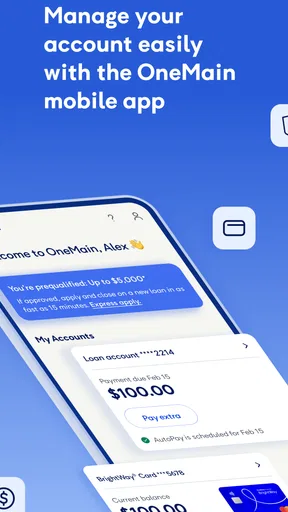
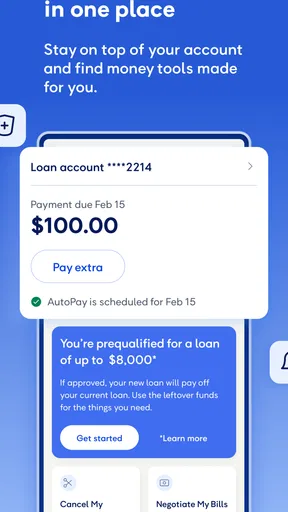
Once you’re logged in, you can view all your loan information right on the home screen. This includes your loan balance, due dates, and payment history. It’s all laid out in a way that makes it super easy to understand at a glance, which is a huge plus if you’re juggling multiple financial commitments.
Features that Make Life Easier
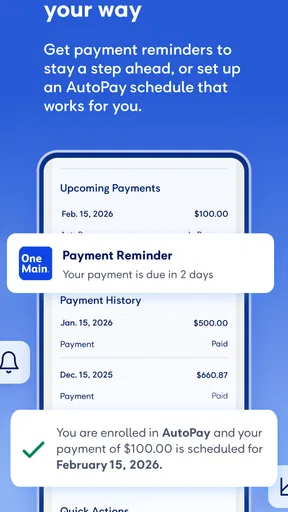
One of the standout features of this app is the payment scheduling. With just a few taps, you can set up automatic payments so you never miss a due date again. This is particularly useful if you’re the kind of person who tends to forget things until the last minute (like me!).
Another feature I love is the loan calculator. It allows you to play around with different loan scenarios to see how changes in your payment schedule or interest rates might affect your total loan cost. It’s a great tool for planning ahead and making informed financial decisions.
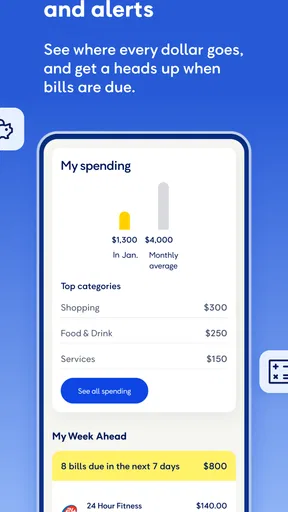
For those who are always on the go, the mobile alerts feature is a lifesaver. You’ll receive notifications about upcoming payments and important account changes, so you’re always in the loop, no matter where you are.
Security and Support
Security is a big deal when it comes to managing your finances, and the app’s approach is reassuring. If you ever run into any issues, customer support is available by phone, which gives you another route when a question is too involved for a quick screen check.
I had a minor hiccup while setting up my account, and I can honestly say their support team was fantastic. They were quick, efficient, and genuinely eager to help, which is something you don’t always find these days.
Final Thoughts
In the world of financial apps, it stands out for its ease of use, loan-focused tools, and helpful support. Whether you're just starting out on your financial journey or you're a seasoned pro looking to streamline your loan management, this app has something to offer.
Overall, I’d say give it a try if you’re looking for a way to simplify your financial life. It’s one of those apps that once you start using, you’ll wonder how you ever managed without it. And the best part? It’s right there at your fingertips, ready to help you keep your loan details close at hand.
Pros
- User-friendly interface for easy navigation.
- Quick and straightforward loan application process.
- Flexible repayment options available.
- In-app budgeting tools to manage finances.
- Prompt customer service responses.
Cons
- High interest rates compared to competitors.
- Limited loan amounts for first-time users.
- App requires frequent updates for stability.
- No option for joint account management.
- Limited educational resources within the app.
FAQs for OneMain Financial
What is OneMain Financial and how does it work?
OneMain Financial is a personal loan platform designed to help users manage their financial needs. It offers a user-friendly app that allows you to apply for loans, manage payments, and track your financial progress. The app provides personalized loan options and tools to help you stay on top of your financial goals.
What are the eligibility requirements for applying for a loan?
To apply for a loan with OneMain Financial, you must be at least 18 years old and a U.S. resident. You’ll need to provide proof of income, a valid ID, and some personal financial information. The app will assess your creditworthiness to determine your eligibility and loan terms.
How secure is my personal information on the app?
OneMain Financial takes security seriously, employing robust encryption methods to protect your personal and financial data. The app uses secure login features and regularly updates its security protocols to safeguard against unauthorized access. User privacy is a top priority, ensuring your information remains confidential.
Can I manage my loan payments directly through the app?
Yes, the OneMain Financial app allows you to manage your loan payments directly. You can set up automatic payments, track your payment history, and receive reminders for upcoming due dates. This feature ensures that you stay on top of your financial commitments effortlessly through your mobile device.
Are there any fees associated with using the OneMain Financial app?
While the app itself is free to download and use, OneMain Financial may charge fees related to loan processing, late payments, or specific services. It's crucial to review the terms and conditions of your loan agreement to understand any potential fees you may incur during the loan process.


